THE DRAWING INDEX — SHT CX
EVERY LINK, ONE GLANCE.
The connective tissue between design artifacts, drawn as a tight grid of cells instead of a tall stack of half-empty boxes. From any record, see what it touches, how much, and reach any of with a click.
Everything this record touches, counted and one click away.
THE CONNECTIVE TISSUE, COUNTED AND A CLICK AWAY.
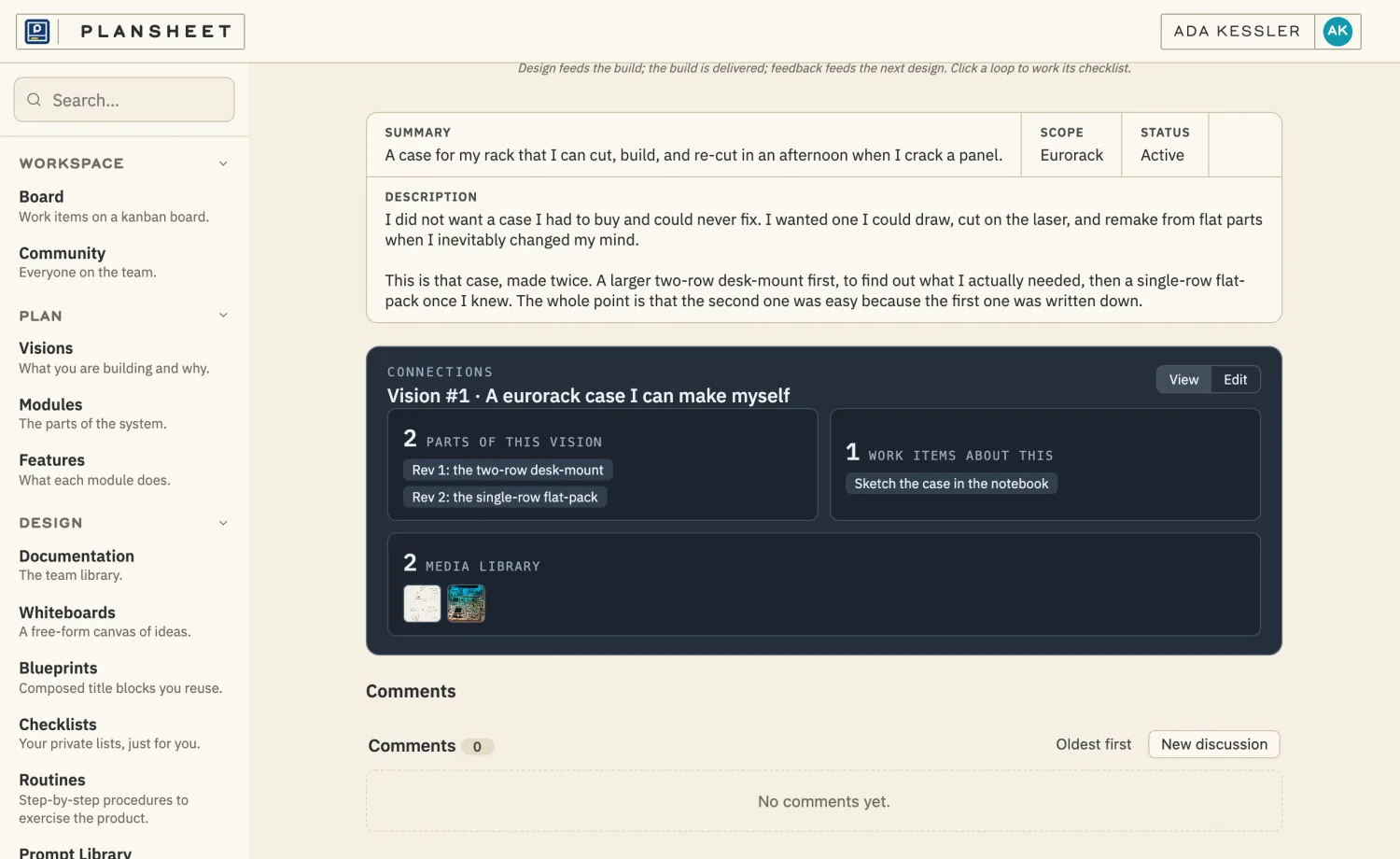
EVERYTHING LINKED: BOTH REVISIONS, THE WORK, AND THE MEDIA.
FROM A SYNTH CASE, MADE TWICE ->
FROM ONE RECORD TO WHAT'S IMPORTANT
Context is worth 1,000 words. Every record carries its links: the customer behind an issue, the call it came from, the work items addressing it, the documents and comments hanging off it. The grid shows each relation and how many things sit in it. Click a cell and it opens to the items. You shouldn't have to remember what connects to what. Because the Plansheet already knows.
EMPTY CELLS DO NOT SHOW
A relation with nothing in it gets no cell. You see the links that exist, not a screen of zeros and empty headers to scroll past. The grid stays small and honest, so what's been designed reads at a glance instead of hiding in a wall of software blanks.
SHOW WHAT IS THERE, NOT WHAT IS MISSING.
LINK WITHOUT LEAVING
Add connections intentionally, right where you are, with a focused picker that doesn't drag you off the page. The same grid sits on every part of your design so the connective tissue reads the same way whether you're looking at a vision, a work item, or a feedback note. Learn it once and you know it everywhere.
WHAT THE GRID SHOWS
01
THE CELLS
One per relation that has something in it, labeled in the craft's own words.
02
THE COUNTS
How many things sit behind each cell, read before you ever click in.
03
EXPAND IN PLACE
Open a cell to its items and jump to any of them, without leaving the record.
04
ADAPTIVE LINKER
Add a link with a focused picker that keeps you where you are.
THE SAME GRID ON EVERY RECORD
SEE WHAT CONNECTS
Open any record. Read its links at a glance. Reach them in a click.
START DRAFTING BACK TO THE INDEX